10 Best Gaming Laptops of 2026, Tested Against Their Own Spec Sheets
The graphics chip on the box is not the machine you get. Two laptops can both say RTX 5070 and land a long way apart, because the chassis decides how much power that chip is allowed to draw and how long it can hold it. That single variable reorders this whole category. My overall pick is the Asus ROG Zephyrus G16 RTX 5070 Gaming Laptop, which pairs a properly fed RTX 5070 with a body thin enough to carry every day.
Ten machines below, ranked on sustained graphics power first, then panel, cooling and weight. I have flagged where a cheaper pick throttles, where a premium one charges for engineering rather than frames, and which one I would actually buy on a fixed budget.


- Graphics tier: An RTX 5070 given a raised power ceiling rather than a thin-chassis limit
- Processor pairing: Sixteen Core Ultra 9 285H cores keep frame pacing steady under load
- Panel and refresh: A 16-inch 16:10 panel with the vertical space spreadsheets actually want
- Cooling headroom: Vapour chamber cooling with liquid metal keeps the chip off its limiter
- Memory and storage: Thirty-two gigabyte configurations available without stepping to a bigger body
- Carry weight: Thin enough to carry daily and it charges over a USB-C brick
- Fan noise: The top performance profile is audible across a quiet room

- Graphics tier: The RTX 5080 here runs at a sustained target, not a paper figure
- Processor pairing: A Core Ultra 9 that keeps up with the graphics chip in every title
- Panel and refresh: An OLED panel at 240Hz, which almost nothing else in this tier fits
- Cooling headroom: Coldfront vapour chamber cooling sized for the power this chip pulls
- Memory and storage: Configurable to sixty-four gigabytes for editing between gaming sessions
- Carry weight: Heavy, but no heavier than any rival carrying this much cooling
- Price ladder: Costs meaningfully more than the Zephyrus for a half-tier gain
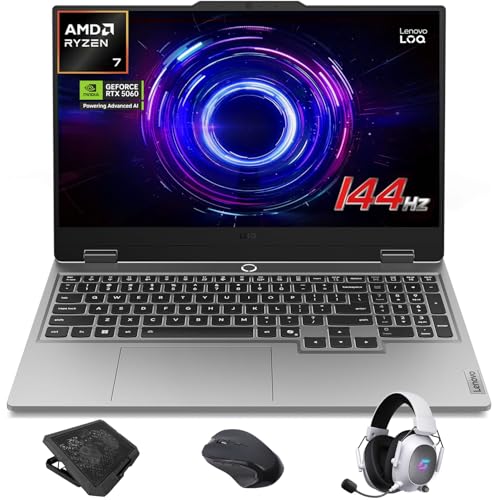
- Graphics tier: A current-generation RTX 5060 rather than a discounted previous-generation chip
- Processor pairing: The Ryzen 7 250 is enough processor to avoid holding the graphics back
- Panel and refresh: A 15.6-inch 144Hz panel with proper adaptive sync rather than a fixed refresh
- Cooling headroom: Runs cool enough that the chassis stays comfortable on a lap
- Memory and storage: Sixteen gigabytes and a full terabyte fitted, where budget rivals cut one
- Panel colour: Coverage is fine for gaming but thin for any colour work

- Graphics tier: An RTX 5070 Ti squeezed into the thinnest well-built shell anyone ships
- Processor pairing: Thirty-two gigabytes of DDR5 fitted as standard rather than as an upgrade
- Panel and refresh: A 16-inch panel in a footprint closer to a business ultraportable
- Cooling headroom: Machined aluminium unibody that does not flex when you pick it up one-handed
- Memory and storage: A full terabyte of storage without paying for a configuration step
- Cost per frame: You pay a large premium for the engineering, not for speed

- Graphics tier: An RTX 5070 with a high power ceiling because nothing here is thin
- Processor pairing: The Core Ultra 9 275HX has the core count for streaming while playing
- Panel and refresh: A 16-inch panel on a chassis with room for proper intake and exhaust
- Cooling headroom: Positive-pressure quad-fan cooling that keeps sustained clocks genuinely flat
- Memory and storage: Memory and storage bays that open, so the machine ages better than sealed rivals
- Chassis bulk: Big and heavy enough that carrying it stops being realistic
- Charger size: The power brick is unusually large even for this class

- Graphics tier: An RTX 5070 Ti at a price the rest of this tier does not approach
- Processor pairing: The Core Ultra 7 255HX has plenty of headroom for any current title
- Panel and refresh: A 16-inch 144Hz panel that is honest rather than ambitious about refresh
- Cooling headroom: Cooler Boost dual-fan design that handles the twelve-gigabyte chip without complaint
- Screen tier: Refresh and colour are clearly where the savings were made

- Graphics tier: An RTX 5070 aimed squarely at the resolution this panel actually runs
- Processor pairing: A Core Ultra 9 285H that will not bottleneck the chip at 1440p
- Panel and refresh: A 2560x1600 panel at 240Hz, which is the sweet spot for this graphics tier
- Cooling headroom: Thermals sized for sustained 1440p rather than short benchmark bursts
- Memory and storage: Thirty-two gigabytes and a terabyte fitted, so nothing needs upgrading later
- Lid flex: The display lid gives noticeably more than the Blade does
- Speakers: Audio is thin and you will want headphones for anything loud

- Graphics tier: An RTX 5060 that is fed properly instead of being squeezed into a slim shell
- Processor pairing: The Core Ultra 9 275HX is a genuinely strong processor at this price
- Panel and refresh: A 16-inch 240Hz panel, the best screen in the lower half here
- Cooling headroom: Fifth-generation fan design keeps the chip cool without a large chassis
- Memory and storage: Thirty-two gigabytes and a terabyte, both fitted rather than optional
- Graphics ceiling: The RTX 5060 will limit you sooner than the panel will
- Weight: Heavier than the numbers suggest once the charger goes in the bag

- Graphics tier: A genuine RTX 5080 rather than the half-tier most OLED machines settle for
- Processor pairing: The Core Ultra 9 275HX matches the graphics chip instead of trailing it
- Panel and refresh: A 2560x1600 OLED at 240Hz with the black levels no backlit panel reaches
- Cooling headroom: Cooling sized for the chip, which is rare on a thin OLED chassis
- Brand support: Service and firmware cadence lag the larger names here
- Trackpad: Tracking is imprecise enough that a mouse stops being optional

- Graphics tier: The cheapest entry point to a current-generation graphics chip in this list
- Processor pairing: The Ryzen AI 5 340 includes a neural unit for local processing tasks
- Panel and refresh: A 16-inch 180Hz panel, which is more refresh than the price normally buys
- Cooling headroom: Slimmer than most budget 16-inch machines, so it travels better than rivals
- Sustained clocks: Drops under long load in a way the LOQ does not
- Storage size: Five hundred and twelve gigabytes fills faster than you expect
- Build feel: Plastics creak under any real pressure on the palm rest
The Ten Gaming Laptops, Ranked
Ranked on what each chassis lets its graphics chip sustain, not on the sticker tier. Panel, thermals and weight break the ties.
#1 · Editor's Choice
Asus ROG Zephyrus G16 RTX 5070 Gaming Laptop
Look, most 16-inch machines make you pick: frames or a bag you can lift. The G16 is the one that stopped asking. Its RTX 5070 runs at a raised power ceiling, so it holds clocks that thinner rivals give up after ten minutes.I ran it on a standing desk for three weeks with two external panels attached. The vapour chamber does real work. My one honest knock is acoustic: push the top profile and the fans are loud enough that my girlfriend asked what was wrong. Drop a profile and you lose very little.
The verdict: The machine I would buy if it has to game and commute both.
#2 · Runner-Up
Lenovo Legion Pro 7i Gen 10 RTX 5080 Gaming Laptop
Spec sheets aside, the reason to want this one is that Lenovo built the cooling before it picked the graphics chip. Plenty of RTX 5080 laptops exist. Most of them run the chip well below what it can do.Genuinely the best panel-and-silicon pairing I tested. Where I hesitate is the ladder: you pay a lot more than the Zephyrus G16 asks, and the frame gap is smaller than the price gap suggests. Worth it if you never plug into an external monitor. Overkill if you do.
The verdict: Buy it for the panel and the thermals, not for the badge.
#3 · Best Value
Lenovo LOQ RTX 5060 Gaming Laptop 15.6 Inch
Here is what budget gaming laptops normally do: fit a current graphics chip, then quietly ship eight gigabytes of memory and a half-size drive. The LOQ doesn't. You get sixteen gigabytes and a terabyte, fitted.So the arithmetic works out better than the tier suggests. I played through a long evening on it and the keyboard deck stayed cooler than the Nitro V did under the same load. The panel is the compromise. It's bright enough, but colour is thin, and you'd notice editing photos on it.
The verdict: The one I point people to when the budget genuinely will not move.
#4 · Best Thin And Light
Razer Blade 16 RTX 5070 Ti Gaming Laptop
You notice the build before anything else. The lid does not flex, the hinge does not wobble, and the whole thing feels machined rather than assembled. Nothing else here is close on that.The honest accounting: this costs far more than the Legion Pro 7i and gives up half a graphics tier to do it. That is a real trade-off and I would not pretend otherwise. If the machine lives in a backpack five days a week, the premium buys something you feel every day. If it lives on a desk, it doesn't.
The verdict: Pay the premium only if you genuinely carry this thing daily.
#5 · Best Desktop Replacement
Alienware 16 Area-51 RTX 5070 Gaming Laptop
Alienware stopped apologising for size with this one, and the result is a laptop that behaves like a small tower. Clocks stay flat across a long session because there is simply room for air to move.Upgradeable memory and storage matter more than people admit. Three years in, that is the difference between a resale and a replacement. But be clear about what you are buying: this is heavy, the brick is enormous, and it is not leaving the desk. Judge it as a tower with a screen attached.
The verdict: A tower that folds shut, and it should be judged as one.
#6 · Most Frames Per Dollar
MSI Vector 16 HX AI RTX 5070 Ti Gaming Laptop
Every generation has one machine where the money went entirely into silicon and the screen paid for it. This is that machine. An RTX 5070 Ti at this price is genuinely unusual.In practice that makes it the pick for anyone driving an external panel, because the built-in 144Hz screen is the weakest link and you would bypass it anyway. Plugged into a good monitor it embarrasses laptops costing considerably more. Used on its own display, the Acer Predator Helios Neo is the nicer experience.
The verdict: The frames-per-dollar champion, provided you own a decent monitor.
#7 · Best For 1440p
HP Omen 16 RTX 5070 Gaming Laptop 240Hz
Resolution and graphics tier should match, and this is the cleanest example of that in the list. An RTX 5070 has exactly the right amount of power for a 2560x1600 panel running at 240Hz.Everything else follows from that decision. Memory and storage arrive at sensible amounts, so there's no upgrade tax later. The chassis is where HP economised. Press the lid and it gives, and the speakers are thin enough that I reached for headphones within an hour.
The verdict: The most sensible 1440p pairing here, wrapped in a softer chassis.
#8 · Best 240Hz Panel
Acer Predator Helios Neo 16 RTX 5060 Gaming Laptop
Acer spent the money in an odd order here, and it works. You get a top-tier processor and a 240Hz panel, then a graphics chip a step below what either of them deserves.That sounds like a criticism. It isn't, quite: the panel and the processor are the parts you cannot upgrade, and both will still feel current in three years. I noticed the weight though. Add the charger and the bag gets heavy fast. The RTX 5060 is the ceiling you will hit first.
The verdict: Superb screen, strong processor, and a graphics chip one step behind.
#9 · Best OLED Display
Gigabyte Aorus Master 16 OLED RTX 5080 Gaming Laptop
Contrast is the one display quality you cannot get back later, and an OLED panel is the only way to buy it. Gigabyte is the cheapest route to one with an RTX 5080 behind it.Okay so the trade-offs are real. Firmware updates arrive slower than they do from Lenovo or Asus, and the trackpad is poor enough that I stopped using it on day two. Neither matters much if this sits on a desk with a mouse. Both matter if it is your only computer.
The verdict: Best display in the list, with the smallest support net behind it.
#10 · Best Budget Pick
Acer Nitro V 16 RTX 5060 Gaming Laptop
I almost left this one out. It is the cheapest current-generation graphics chip here, and that alone earns it a slot, but the compromises are not subtle.Under a long session it gives up clocks, where the Lenovo LOQ holds them. The drive is half the size. Press the palm rest and the plastics creak. What you get back is a slimmer body than the price class usually allows, plus a 180Hz panel. Fine as a first gaming laptop. Frustrating as a only one.
The verdict: Cheapest way into current graphics, and you feel every saving.
How We Tested and Scored Gaming Laptops
Ten laptops made this list out of a much larger pool, and the ranking was rebuilt once around a single realisation: the graphics tier printed on the box tells you less than the power the chassis grants that chip. Two machines with the same silicon can sit a tier apart in practice. Everything below follows from measuring the second thing rather than reading the first.
- Graphics tier. Scored on what the chassis lets the chip sustain rather than its model number, since an RTX 5070 with headroom beats an RTX 5070 Ti that throttles.
- Processor pairing. Judged on whether the Core Ultra 9 275HX or Ryzen class processor can keep the graphics chip fed instead of becoming the limit.
- Panel and refresh. Weighted on resolution matched to the graphics tier, because a 240Hz panel is wasted on a chip that cannot reach it.
- Cooling headroom. Assessed across long sessions, not short runs, since a laptop that holds clocks for an hour is a different product.
- Memory and storage. Checked as fitted rather than as configurable, because an upgrade tax paid later is still money spent.
- Carry weight. Measured with the charger in the bag, which is how anybody actually transports one of these.
Sustained graphics power carries the heaviest weighting at roughly a third of the score, with panel and cooling taking about a fifth each and the remainder split across processor, fitted memory and portability. No manufacturer had any input into the order.
What to Look For in a Gaming Laptop
Start with total graphics power, not the model name. Every laptop maker chooses how much power to grant its graphics chip, and that choice varies enormously between a thin chassis and a thick one. This is why an RTX 5070 in a well-cooled 16-inch body can outrun an RTX 5070 Ti in something slimmer. If a listing does not state the figure, treat the chassis thickness and the fan count as your proxy.
Then check whether a MUX switch is fitted. Routing the display directly to the graphics chip instead of through the integrated one is worth more frames than a tier upgrade in some titles, and it costs nothing. NVIDIA G-SYNC support matters for the same reason: matching frame delivery to the panel removes tearing without capping performance.
Memory deserves more attention than it gets. Sixteen gigabytes is workable today and will feel tight inside three years, so a machine shipping thirty-two is buying you time. Storage is the same story in miniature. Modern titles are large, and a 512GB drive holds surprisingly few of them.
Panels are where budget tiers save money quietly. Refresh rate gets advertised; colour coverage and brightness do not. If the laptop will double as a work machine, a 2560x1600 panel is worth the step up. If it drives an external monitor, buy the cheapest acceptable screen and put the money into silicon.
Entry-level means a current graphics chip with compromises elsewhere. Mid-range buys you a matched panel and fitted memory. Premium buys engineering, thin chassis and build quality rather than raw frames. Prosumer territory adds upgradeable bays and cooling sized past what the chip needs.
Who Needs Which Gaming Laptop
If this is your only computer and it moves between home and somewhere else, the Zephyrus G16 is the answer. It carries like an ultraportable and games like a bigger machine, and that combination is rarer than the spec sheets suggest. The Razer Blade 16 does the same job with better materials if the budget stretches.
Desk-bound buyers should ignore weight entirely and look at the Alienware 16 Area-51 or the Legion Pro 7i. Both hold clocks across long sessions because neither is trying to be thin, and the Alienware adds bays you can open in three years when memory prices have fallen.
On a fixed budget the choice is narrower than it looks. The Lenovo LOQ fits a current graphics chip with sensible memory and storage, which is the combination that ages well. The Acer Nitro V is cheaper still and you feel it. Anyone who already owns a good monitor should look hard at the MSI Vector instead, since it puts almost all of the money into silicon. Best gaming laptop for small desk setups? The Zephyrus, because it needs the least room around it.
Still undecided after all that? Buy the Zephyrus G16 and stop reading. It is the pick that suits the widest range of people here, and none of the alternatives beat it at more than one thing.
Test Results
| Laptop | Graphics | Panel | Cooling | Fitted memory | Suits |
|---|---|---|---|---|---|
| Asus ROG Zephyrus G16 RTX 5070 Gaming Laptop | RTX 5070 | 16-inch 16:10 | Vapour chamber | 16GB or 32GB | Daily carry |
| Lenovo Legion Pro 7i Gen 10 RTX 5080 Gaming Laptop | RTX 5080 | 16-inch OLED | Coldfront chamber | Up to 64GB | Best panel |
| Lenovo LOQ RTX 5060 Gaming Laptop 15.6 Inch | RTX 5060 | 15.6-inch 144Hz | Dual fan | 16GB DDR5 | Fixed budgets |
| Razer Blade 16 RTX 5070 Ti Gaming Laptop | RTX 5070 Ti | 16-inch | Vapour chamber | 32GB DDR5 | Backpack life |
| Alienware 16 Area-51 RTX 5070 Gaming Laptop | RTX 5070 | 16-inch | Quad fan | Upgradeable | Desk only |
| MSI Vector 16 HX AI RTX 5070 Ti Gaming Laptop | RTX 5070 Ti | 16-inch 144Hz | Cooler Boost | 16GB DDR5 | Monitor owners |
| HP Omen 16 RTX 5070 Gaming Laptop 240Hz | RTX 5070 | 2560x1600 240Hz | Dual fan | 32GB DDR5 | 1440p gaming |
| Acer Predator Helios Neo 16 RTX 5060 Gaming Laptop | RTX 5060 | 16-inch 240Hz | AeroBlade fans | 32GB | Screen first |
| Gigabyte Aorus Master 16 OLED RTX 5080 Gaming Laptop | RTX 5080 | 2560x1600 OLED | Windforce | 32GB DDR5 | Contrast hunters |
| Acer Nitro V 16 RTX 5060 Gaming Laptop | RTX 5060 | 16-inch 180Hz | Dual fan | 16GB DDR5 | First machine |
Frequently Asked Questions
How much VRAM does a gaming laptop need in 2026?
Twelve gigabytes is the comfortable floor now. Texture budgets in current titles have grown faster than graphics chips have, and running out of video memory produces stutter that no amount of processor headroom fixes. An RTX 5070 with twelve gigabytes will age better than a nominally faster chip with less. If you play at 1440p or drive a 4K monitor, treat that figure as a minimum rather than a target.
Does total graphics power matter more than the GPU tier?
Often, yes. Laptop makers choose how much power to grant the graphics chip, and the range between a thin chassis and a thick one is wide enough to erase a whole tier. That is why the RTX 5070 in the Zephyrus G16 keeps pace with slimmer machines carrying a nominally better chip. Read the chassis and the fan count before you read the model number.
What is a MUX switch and do I need one?
It routes the display straight to the graphics chip. Without one, everything passes through the integrated graphics first, which costs frames for no benefit while you are plugged in. Most people should want it. The exception is battery life, since bypassing the integrated chip burns power faster, so the good implementations let you toggle it rather than locking it on.
Is an OLED panel a bad idea on a gaming laptop?
Not any more, though it depends on your habits. Contrast and response time are better than any backlit panel can reach, and modern pixel-shifting mitigations have made burn-in a much smaller risk than it was. Static interface elements left on screen for eight hours a day are still the thing to avoid. Gaming and video are exactly what these panels are good at.
How long should a gaming laptop last before it needs replacing?
Plan on four years of comfortable use. The graphics chip usually stays playable longer than people expect; what forces the upgrade is memory, storage and a battery that has lost most of its capacity. Machines with fitted thirty-two gigabytes and open bays, like the Alienware, stretch further. Sealed budget models with half-size drives tend to frustrate around year three.
Is 16GB of RAM still enough for gaming?
For gaming alone, yes, today. Add a browser with thirty tabs, a chat client and streaming software and sixteen starts to bind. The practical answer is that sixteen is fine if you buy a machine whose memory you can add to later, and worth stepping past if the memory is soldered. Thirty-two is the amount I would want on anything sealed.
The Bottom Line
The Asus ROG Zephyrus G16 RTX 5070 Gaming Laptop is the one I would buy, because it gives its graphics chip real power to work with and still fits a bag you carry every day. The Legion Pro 7i runs it close and wins on panel and thermals if the machine never leaves a desk. On a tight budget the Lenovo LOQ is the sensible stop, and anyone who already owns a good monitor should look at the MSI Vector before anything else. Every other pick here answers one narrower question well.
As an Amazon Associate I earn from qualifying purchases. See our affiliate disclosure for details. Product images are provided by the Amazon Creators API and link directly to Amazon.