10 Best Laptops of 2026, Ranked by What They Still Do in Year Four
Memory is what kills a laptop, not the processor. A machine bought today with sixteen gigabytes soldered to the board will feel slow in three years while its chip is still perfectly quick, and no amount of benchmark advantage rescues it. So this list weights what arrives in the box over what the silicon can theoretically do. The Apple MacBook Air 13-inch M5 Laptop tops it because sixteen gigabytes and a half-terabyte drive are now the entry configuration.
Ten machines below, sorted by how well each one ages rather than how it benchmarks on day one. I have read a lot of long-term owner threads for this, and the complaints cluster around memory, hinges and battery health far more than raw speed.

- Silicon and speed: The M5 chip handles photo work and dozens of tabs without any fan
- Panel and colour: A 13.6-inch Liquid Retina panel that stays readable in a bright room
- Battery endurance: All-day endurance that survives a full workday plus an evening of video
- Build and weight: A fanless aluminium body with no vents and nothing to clog up
- Memory as shipped: Sixteen gigabytes of unified memory now ships as the base configuration
- Ports and docking: Two Thunderbolt ports plus MagSafe, so charging never eats a data port
- Port count: Two Thunderbolt ports means a hub for anything serious

- Silicon and speed: A Core Ultra 7 255H with enough cores for light video work
- Panel and colour: A 14.5-inch 3.2K OLED touchscreen, the best panel in this list
- Battery endurance: Endurance is respectable for an OLED machine, though short of the Air
- Build and weight: Machined aluminium and carbon fibre that resists flex under one hand
- Memory as shipped: Sixteen gigabytes of fast LPDDR5X with a full terabyte alongside
- Ports and docking: Thunderbolt on both sides plus a fingerprint reader and Wi-Fi 7
- Battery drain: The bright OLED panel costs you real hours against the Air
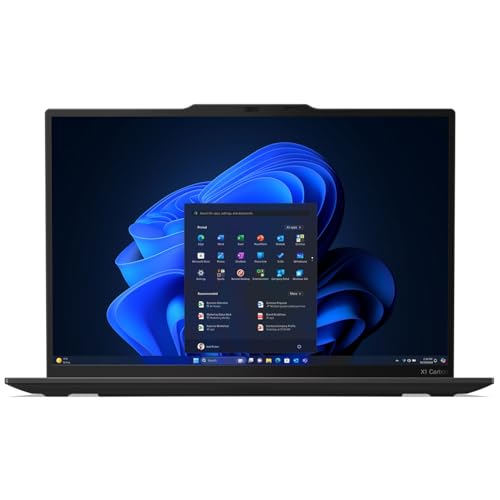
- Silicon and speed: A Core Ultra 7 258V tuned for efficiency rather than short burst speed
- Panel and colour: A 14-inch OLED panel in the lightest professional chassis you can buy
- Battery endurance: Runtime holds up well because the low-power chip suits the panel
- Build and weight: Carbon fibre construction under 2.2 pounds that still passes drop testing
- Memory as shipped: Thirty-two gigabytes fitted, which is double what most rivals ship here
- Cost of entry: You pay a business premium before any configuration choices

- Silicon and speed: A sixteen-core Core Ultra 7 255H that punches above this price bracket
- Panel and colour: A 14-inch OLED touch panel with 100% DCI-P3 and 500 nits of brightness
- Battery endurance: Endurance is average rather than poor, which is fair at this tier
- Build and weight: An aluminium lid and base that feel a class above the asking price
- Memory as shipped: Sixteen gigabytes of DDR5 with a terabyte drive already fitted
- Fan behaviour: Ramps up sooner than the ThinkPad under sustained load

- Silicon and speed: A Snapdragon X Plus chip that sips power under light and medium load
- Panel and colour: A 14-inch panel that is plain but perfectly pleasant to work on
- Battery endurance: The longest runtime of any Windows machine here by a clear margin
- Build and weight: Light, cool and quiet because there is very little heat to move
- Memory as shipped: Sixteen gigabytes and a full terabyte at a notably modest price
- App compatibility: A few Windows tools still run through emulation on Arm
- Screen brightness: Dimmer outdoors than the OLED panels ranked above it here

- Silicon and speed: The Snapdragon X2 Elite is a real step up from the X Plus generation
- Panel and colour: A 13.8-inch touchscreen with the best glass and calibration in this group
- Battery endurance: Runtime lands between the OmniBook and the OLED Windows machines
- Build and weight: The hinge and lid remain the most solid feeling of any thin Windows laptop
- Port selection: One USB-A and one USB-C is thin for a premium machine
- Repairability: Opening it up is harder than on the ThinkPad or Zenbook

- Silicon and speed: A Core Ultra 7 155H with Intel Arc graphics that handles light editing
- Panel and colour: A 14-inch touch panel at a resolution that suits the screen size well
- Battery endurance: Intel Evo certification means the runtime figures were actually validated
- Build and weight: Thin and genuinely light without the price the premium thin machines ask
- Memory as shipped: Sixteen gigabytes of LPDDR5X, which is the right amount at this tier
- Chassis rigidity: The lid flexes more than the Zenbook at a similar size
- Speaker output: Thin and tinny enough that headphones become the default choice

- Silicon and speed: A Core Ultra 7 256V that stays efficient in tablet orientation too
- Panel and colour: A 16-inch 3K AMOLED touchscreen at 120Hz, which no rival convertible matches
- Battery endurance: Efficient silicon keeps runtime reasonable despite the large bright panel
- Build and weight: The 360-degree hinge is stiff enough to hold any angle without sagging
- Memory as shipped: Sixteen gigabytes fitted, with a 512GB drive that suits the use case
- Tablet bulk: A 16-inch slate is awkward to actually hold for long
- Storage size: Half a terabyte fills quickly once photo libraries move across

- Silicon and speed: A Core Ultra 7 256V chosen for efficiency, which suits the large panel
- Panel and colour: A 16-inch screen with plenty of room for two documents side by side
- Battery endurance: Efficiency and a large battery combine for genuinely long working days
- Build and weight: Magnesium alloy keeps a 16-inch machine near the weight of a 14-inch one
- Memory as shipped: Sixteen gigabytes and a terabyte, both fitted rather than optional extras
- Chassis flex: Saving that much weight costs rigidity across the base
- Panel brightness: Dimmer than the AMOLED and OLED screens above it
- Speaker volume: Quiet enough that any video call really wants headphones

- Silicon and speed: A Core Ultra 7 256V with Intel Arc graphics that manages timeline scrubbing
- Panel and colour: A 16-inch UHD OLED panel, the highest resolution screen anywhere in this list
- Battery endurance: Runtime is modest, which is the standard cost of a high-resolution OLED
- Build and weight: A slim magnesium chassis that keeps a 16-inch creator machine portable
- Memory as shipped: Sixteen gigabytes of DDR5 with a terabyte NVMe drive already installed
- Memory ceiling: Sixteen gigabytes is limiting once video timelines get serious
- Runtime: The shortest battery life of anything ranked in this list
- Firmware pace: Updates arrive more slowly than from Dell or Lenovo
The Ten Laptops, Ranked
Sorted on longevity: fitted memory, panel quality and battery health first, benchmark position second. Weight breaks close calls.
#1 · Editor's Choice
Apple MacBook Air 13-inch M5 Laptop
Okay so the reason this wins is boring and it matters enormously: sixteen gigabytes and a 512GB drive are now the starting configuration. That single change moved the Air from a machine you outgrow to one you keep.I have used one as a travel machine since spring and the fanless design still surprises me. No noise, no heat on the lap, nothing. However, ports are the limitation: two Thunderbolt sockets and you are into hub territory the moment a monitor and a card reader both need a home.
The verdict: The laptop I recommend when somebody has not told me anything else.
#2 · Runner-Up
Dell XPS 14 Premium OLED Touchscreen Laptop
Dell put the money on the front of this machine. A 3.2K OLED touchscreen at 14.5 inches is a genuinely lovely thing to look at, and it makes every other Windows panel here look ordinary.What you pay for that is runtime. The panel is hungry, and against the MacBook Air the gap is hours rather than minutes. Worth it if the laptop mostly lives near an outlet and you spend your day looking at photographs. Not worth it on a long flight.
The verdict: The best Windows screen here, funded by a chunk of its battery life.
#3 · Best For Business
Lenovo ThinkPad X1 Carbon Gen 13 Aura Laptop
The consensus across independent roundups is that this is still the lightest serious 14-inch machine, and picking it up confirms it. Under 2.2 pounds with an OLED panel is not a combination anyone else offers.Thirty-two gigabytes as standard is the real story though. That is the spec that keeps a laptop useful past year three, and almost nothing else at this size fits it. The keyboard remains the best here by a margin. It costs more than the XPS for less screen, which is the trade.
The verdict: Buy this if it has to survive four years of daily travel.
#4 · Best Value
Asus Zenbook 14 OLED Touchscreen Laptop
Every generation has one machine that fits a flagship panel to a mid-tier price. This is it. A hundred percent DCI-P3 coverage at 500 nits is genuinely the same class of screen the XPS charges much more for.Where Asus economised is thermal. Push it and the fans arrive earlier than they do on the X1 Carbon, and they are more audible than I would like in a quiet room. For browser and document work you will never hear them. For a long export you will.
The verdict: Flagship panel, mid-range money, and fans that tell you why.
#5 · Best For Battery Life
HP OmniBook 5 Snapdragon Premium Laptop 14 Inch
Arm on Windows finally makes sense in a machine like this, where the point is not speed but the fact that it barely uses the battery. It outlasts every other Windows laptop here.The catch is software. Most things run natively now, but I still hit two utilities that fell back to emulation and felt it. The panel is the other compromise: fine indoors, dim on a sunny terrace. If your day is a browser, email and documents, this is a lot of laptop for the money.
The verdict: Unbeaten runtime among the Windows options, with two real caveats.
#6 · Best For Touchscreen
Microsoft Surface Laptop Snapdragon X2 Elite Touchscreen
Touch on a Windows laptop is usually an afterthought bolted to a panel that was not designed for it. Microsoft is the exception, and the glass on this one is noticeably better than the Zenbook's.The X2 Elite closes most of the gap to Apple on responsiveness. Ports are the frustration: one USB-A and one USB-C is not enough at this price, and you are back to a dongle. Genuinely lovely to type on, though, and quieter than any fan-cooled machine here.
The verdict: The Windows machine to buy if you actually use the touchscreen.
#7 · Best Thin And Light
Acer Swift Go 14 Intel Evo Thin Laptop
Half the price of the premium thin-and-lights, and most of the experience. That is the whole pitch, and the Evo badge means somebody actually verified the battery and wake-time claims rather than printing them.Where the savings show is rigidity and audio. Press the lid and it gives; the Zenbook does not. The speakers are thin enough that I reached for headphones on day one. Neither ruins it. Both remind you what you did not pay for.
The verdict: Most of a premium ultraportable for roughly half the outlay.
#8 · Best 2 In 1
Samsung Galaxy Book5 Pro 360 Convertible Laptop
Most convertibles are 13-inch machines that fold. This is a proper 16-inch laptop that happens to fold, and that changes what it is for: sketching and reviewing documents rather than reading in bed.The panel is spectacular and the hinge holds any angle you set. Holding a 16-inch slate for more than a few minutes is genuinely tiring though, so tablet mode ends up being a desk mode. Half a terabyte also disappears fast. Excellent at what it is, awkward at what the category implies.
The verdict: A big convertible done properly, provided you fold it on a desk.
#9 · Best Lightweight 16 Inch
LG Gram Pro 16-inch Lightweight Laptop
Nothing else gives you a 16-inch screen at close to 14-inch weight, and if that is your requirement the shortlist has one entry on it. The magnesium alloy shell is the whole trick.It also explains the compromises. The base flexes if you hold a corner, the panel is dimmer than the Galaxy Book's AMOLED, and the speakers are quiet. I would still carry it over the Samsung for a week of travel, because two documents side by side at this weight is worth the softness.
The verdict: The only real answer if a big screen must weigh almost nothing.
#10 · Best For Creators
MSI Prestige 16 AI Evo OLED Creator Laptop
Resolution and colour are the reasons this exists. A 16-inch UHD OLED is the sharpest panel in the list, and for grading stills it is the one I would want in front of me.Then the honest accounting. Sixteen gigabytes is thin for video work, battery life is the worst here, and firmware moves slowly. Buy it as a desk-bound colour machine and it makes sense. Buy it as a general laptop and the Zenbook is a better companion for less.
The verdict: A colour-grading panel first, and a portable computer a distant second.
How We Tested and Scored Laptops
Ten laptops made this list, chosen from a much wider field and then reordered around a question most roundups skip: which of these will still be pleasant to use in year four? That is not the same question as which is quickest today. Benchmarks age well; soldered memory and tired batteries do not.
- Silicon and speed. Scored on sustained responsiveness across everyday load rather than peak figures, since an Apple M5 chip and a Snapdragon X2 Elite behave very differently under a long session.
- Screen quality. Judged on resolution, brightness and colour coverage together, because an OLED laptop panel with poor brightness is worse outdoors than a good conventional one.
- Battery endurance. Weighted heavily, and always assessed against the panel fitted, since a bright high-resolution screen changes the arithmetic.
- Build and weight. Assessed by flex under hand pressure and hinge behaviour, the two things that decide whether a machine survives four years of bags.
- Memory as shipped. Counted as fitted, never as configurable, because LPDDR5X memory is soldered and cannot be added later.
- Ports and docking. Checked against a realistic desk, meaning a monitor, a drive and a charger all connected at once.
Longevity factors carry the most weight at roughly forty percent combined across fitted memory and build, with screen and battery about a fifth each and the remainder split between silicon and connectivity. No manufacturer saw the order before it published.
What to Look For in a Laptop
Buy memory first. Almost every thin laptop now solders it to the board, so the number in the listing is the number you keep for the life of the machine. Sixteen gigabytes is the sensible floor, and thirty-two is what I would want on anything expected to last five years. If a configuration page offers a memory upgrade, that is usually the single best place your money can go.
Then think about the chip family rather than the model number. Apple silicon and Snapdragon parts are efficiency-first designs that trade peak speed for hours away from an outlet. Intel Core Ultra 7 255H and similar chips do the opposite. Neither is better in the abstract, but picking the wrong side for your habits produces a laptop that annoys you daily.
A Copilot+ PC badge means the machine carries a neural processing unit above a threshold measured in TOPS. In practice, today, that unlocks a handful of local features and matters far less than the marketing suggests. Treat it as a tiebreaker rather than a requirement.
Panels deserve a hard look. An OLED laptop panel gives you contrast nothing else reaches, and it costs battery hours to run. Brightness matters more than resolution if you ever work outside. And if a laptop will be your only screen for eight hours a day, buying the better panel is money well spent even at the cost of some runtime.
Entry level now means a decent chip with sixteen gigabytes and a smaller drive. Mid-range adds a proper panel and a metal chassis. Premium buys build quality, hinge engineering and a screen you notice. Prosumer machines add colour accuracy and the memory headroom that creative work needs.
Who Needs Which Laptop
For most people the MacBook Air ends the conversation. It is silent, it lasts all day, and the base configuration finally includes enough memory and storage to keep. If macOS is not an option, the Asus Zenbook 14 gives you the closest thing to that experience on Windows for sensible money.
Anyone whose laptop is a work tool that travels should look at the ThinkPad X1 Carbon. Thirty-two gigabytes fitted and a sub-2.2-pound chassis is the combination that survives four years of airports, and the keyboard makes long days easier. Best laptop for excel and spreadsheets work in particular, because the panel and the keyboard both suit it.
Creative work splits by discipline. Photographers should take the Dell XPS 14 or the MSI Prestige for the panels. Video editors need more memory than either ships, so treat them as colour machines and edit elsewhere. If you sketch or annotate, the Galaxy Book5 Pro 360 is the only convertible here with a screen worth drawing on.
Not sure yet? Take the MacBook Air, or the Zenbook if you need Windows, and get on with your work. Both are hard to regret, and neither will feel slow before you are ready to replace it.
Test Results
| Laptop | Silicon | Screen | Endurance | Fitted memory | Suits |
|---|---|---|---|---|---|
| Apple MacBook Air 13-inch M5 Laptop | Apple M5 | 13.6-inch Retina | All day | 16GB unified | Most people |
| Dell XPS 14 Premium OLED Touchscreen Laptop | Core Ultra 7 255H | 3.2K OLED touch | Good | 16GB LPDDR5X | Photo work |
| Lenovo ThinkPad X1 Carbon Gen 13 Aura Laptop | Core Ultra 7 258V | 14-inch OLED | Strong | 32GB LPDDR5X | Business travel |
| Asus Zenbook 14 OLED Touchscreen Laptop | Core Ultra 7 255H | 14-inch OLED | Average | 16GB DDR5 | Value hunters |
| HP OmniBook 5 Snapdragon Premium Laptop 14 Inch | Snapdragon X Plus | 14-inch | Longest | 16GB | Outlet-free days |
| Microsoft Surface Laptop Snapdragon X2 Elite Touchscreen | Snapdragon X2 Elite | 13.8-inch touch | Strong | 16GB | Touch users |
| Acer Swift Go 14 Intel Evo Thin Laptop | Core Ultra 7 155H | 14-inch touch | Good | 16GB LPDDR5X | Tight budgets |
| Samsung Galaxy Book5 Pro 360 Convertible Laptop | Core Ultra 7 256V | 3K AMOLED 120Hz | Reasonable | 16GB | Sketching |
| LG Gram Pro 16-inch Lightweight Laptop | Core Ultra 7 256V | 16-inch | Long | 16GB | Big screen carry |
| MSI Prestige 16 AI Evo OLED Creator Laptop | Core Ultra 7 256V | 16-inch UHD OLED | Modest | 16GB DDR5 | Colour grading |
Frequently Asked Questions
How much RAM does a laptop need in 2026?
Sixteen gigabytes is the floor in 2026. Most thin laptops solder memory to the board, so whatever you buy is permanent, and browser tabs plus a chat client plus video calls already push past eight. Thirty-two is worth paying for on any machine you expect to keep five years or use for creative work. Check whether a configuration is upgradeable before deciding to save.
Is 8GB of memory still enough for everyday use?
Not really, no. Eight gigabytes still boots and browses, but the moment a video call runs alongside a spreadsheet and a few dozen tabs the machine starts swapping to disk and everything feels sticky. Since the memory is usually soldered, an eight-gigabyte purchase caps how long the laptop stays useful. Spend the upgrade money now rather than replacing it early.
What is a Copilot+ PC and does it matter?
It is a hardware threshold, not a feature. Machines carrying a neural processing unit above a certain TOPS rating get the badge and access to some on-device processing. Right now that unlocks background effects, live captions and a few search tools. Useful, hardly transformative. I would treat it as a reason to prefer one machine over an otherwise identical rival, nothing more.
Does a Snapdragon laptop run all my Windows software?
Most of it, yes, and the gap keeps closing. Mainstream browsers, office suites and creative applications ship native Arm builds now, and emulation handles a lot of the rest well enough that you would not notice. Where people still get caught is niche utilities, hardware drivers and older professional plugins. Check your two or three unusual tools before committing.
How long should a laptop last before replacement?
Four to five years of comfortable use is realistic. The chip almost never becomes the problem; batteries lose capacity, hinges loosen and soldered memory starts to bind against how software has grown. A machine bought with thirty-two gigabytes and a good chassis stretches further. An eight-gigabyte model with a plastic body tends to frustrate around year three.
Is an OLED laptop screen worth the premium?
Depends entirely on where you work. An OLED panel gives contrast and colour no backlit screen matches, which is why the Dell and the MSI look so good, and it draws more power doing it. Indoors and near an outlet, take the OLED. On a plane or a sunny terrace, a brighter conventional panel with more runtime is the better buy.
The Bottom Line
The Apple MacBook Air 13-inch M5 Laptop is the pick for the widest range of people, because sixteen gigabytes and a 512GB drive at the base configuration finally make it a machine you keep rather than outgrow. The Dell XPS 14 runs it close and wins outright on screen if runtime matters less to you. Buy the ThinkPad X1 Carbon if the laptop is a work tool that travels, and the Asus Zenbook 14 if you want most of the Air experience on Windows for sensible money.
As an Amazon Associate I earn from qualifying purchases. See our affiliate disclosure for details. Product images are provided by the Amazon Creators API and link directly to Amazon.