10 Best Printers of 2026, Ranked on What They Cost to Keep Running
A printer's purchase price is close to meaningless. The machine that looks cheapest on the shelf routinely costs the most over three years, because consumables are where the money actually goes and nobody puts that on the box. So this list is ordered by cost per page. My top pick is the Brother MFC-J4335DW Ink Tank All-in-One Printer, which ships with up to a year of ink already inside it.
Ten printers below, sorted on running cost first, then print engine, paper handling and how well each one survives being ignored for a month. That last one matters more than you would guess.

- Running cost: Ships with up to a year of ink inside, so the first refill is distant
- Print engine: A colour inkjet engine that handles documents and the occasional photo
- Paper handling: Automatic duplex printing plus a document feeder for multi-page originals
- Scanning side: The flatbed scanner handles books, and the feeder handles stacks
- Network setup: Wireless plus wired networking, so it works on a locked-down network
- Idle behaviour: Refill cartridges are large, which keeps the running cost genuinely low
- Photo quality: Fine for snapshots but no match for a six-ink photo printer
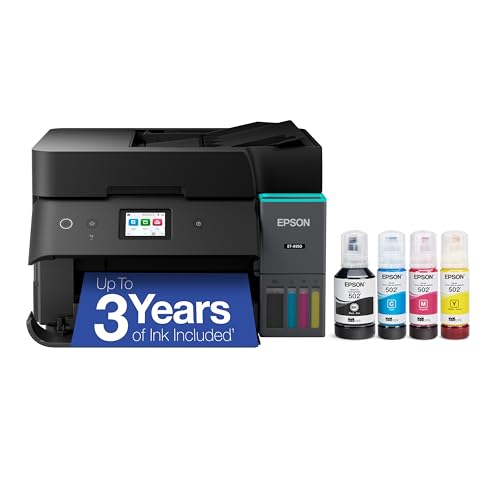
- Running cost: Bottled ink refills cost a fraction of any cartridge system per page
- Print engine: A cartridge-free inkjet engine that you top up rather than replace
- Paper handling: Automatic duplex printing and a document feeder for stacks of originals
- Scanning side: A capable flatbed scanner alongside copy and fax functions
- Network setup: Straightforward wireless setup with mobile printing from the start
- Idle behaviour: Ships with a large initial ink supply that lasts a very long time
- Purchase price: Costs much more up front than a cartridge printer does

- Running cost: Six refillable ink tanks, so photo printing stops being expensive
- Print engine: A six-colour photo engine with dedicated photo black and grey inks
- Paper handling: Borderless printing on photo stock as well as ordinary paper handling
- Scanning side: The scanner is good enough to digitise prints and negatives usefully
- Network setup: Wireless setup is the same straightforward process as the ET-4950
- Document speed: Slower on plain text than any laser printer here

- Running cost: Toner works out cheaper per page than ink for anybody printing text
- Print engine: A monochrome laser engine, which is the right tool for documents
- Paper handling: Automatic duplex printing on a compact chassis that fits a shelf
- Scanning side: No scanner fitted, so this is a print-only machine by design
- Network setup: Wireless and mobile printing that connects without much argument
- No scanning: Print only, so you need a separate scanner or phone app

- Running cost: Cheap to buy, though cartridges make it the most expensive per page here
- Print engine: A conventional colour inkjet engine that handles light household printing
- Paper handling: An automatic document feeder at this price, which is genuinely unusual
- Scanning side: Flatbed scanning, copying and a working fax module all included
- Network setup: Wireless setup with mobile printing and cloud services supported
- Cost per page: Cartridge refills are the priciest per page in this list

- Running cost: Cartridge running costs sit mid-pack, and a subscription lowers them further
- Print engine: A fast colour inkjet engine aimed at document volume rather than photos
- Paper handling: Automatic duplex printing plus a feeder that scans both sides in one pass
- Scanning side: The duplex feeder captures a double-sided stack in a single pass
- Subscription model: The cheapest running cost assumes an ongoing monthly ink plan
- Noise level: Notably louder than either Brother machine while it prints

- Running cost: Refillable tanks at the lowest entry price of any tank printer here
- Print engine: A colour inkjet engine that handles both documents and casual photos
- Paper handling: Basic paper handling with no document feeder, which is the main saving
- Scanning side: Flatbed scanning and copying, though there is no fax module fitted
- Network setup: Visible front-facing ink levels, so you are never surprised by an empty tank
- No feeder: Multi-page originals have to be scanned one sheet at a time
- Print speed: Slower than the Epson tank printers on long documents

- Running cost: Toner economics with a scanner attached, which the Brother laser lacks
- Print engine: A monochrome laser engine sized for small-team document volume
- Paper handling: Automatic duplex printing plus a feeder for scanning and copying stacks
- Scanning side: The flatbed and feeder together handle books and stacks of paperwork
- No colour: Monochrome only, so anything in colour has to go elsewhere
- Toner pricing: Genuine cartridges cost noticeably more than the Brother equivalents

- Running cost: Business-class toner yields that keep the cost per page sensibly low
- Print engine: A laser engine specified for a heavier duty cycle than the household machines
- Paper handling: Automatic duplex, a document feeder and a fax module all fitted as standard
- Scanning side: Wireless and wired networking, which a shared office genuinely needs
- Brand support: Consumables are less widely stocked than Brother or HP
- Software: The driver bundle is dated and awkward on newer systems
- Physical size: Bigger and heavier than its page speed would suggest

- Running cost: High-yield toner support keeps the per-page figure low at real volume
- Print engine: A forty-page-per-minute laser engine, easily the fastest thing here
- Paper handling: Automatic duplex with paper capacity sized for sustained office runs
- Scanning side: Scanning, copying and fax all fitted alongside the print engine
- Network setup: Both wireless and wired networking, which a busy office needs
- Brand familiarity: A less established name, so support is an unknown
- Toner sourcing: Cartridges are harder to find on a shelf locally
- Software polish: The utilities feel unfinished next to the bigger brands
The Ten Printers, Ranked
Sorted on cost per page across three years, then on engine type and paper handling. Idle behaviour breaks the ties.
#1 · Editor's Choice
Brother MFC-J4335DW Ink Tank All-in-One Printer
Okay so the reason this wins isn't speed or picture quality. It's that Brother puts roughly a year of ink in the box and then charges sensibly for refills, which is the opposite of how this industry usually works.Independent lab opinion consistently rates Brother highest for reliability and that matches what I've seen. However, the honest limitation is photographs: a four-ink document engine cannot touch the Epson ET-8500 for prints you'd put in a frame. For everything else, this is the sensible answer.
The verdict: The printer I would put in most homes without thinking twice.
#2 · Cheapest To Run
Epson EcoTank ET-4950 Supertank All-in-One Printer
Spec sheets aside, the arithmetic here is the whole story. You pay substantially more for the machine and then almost nothing to keep it running, and the crossover point arrives faster than most people expect.If you print regularly this is the cheapest printer in the list to own. If you print twice a month, the Canon PIXMA below will serve you better and cost less overall. Refilling the tanks is fiddly the first time and trivial afterwards.
The verdict: Cheapest to run by a wide margin if you print regularly.
#3 · Best For Photos
Epson EcoTank Photo ET-8500 Supertank Printer
Photo printing has always been the thing that bankrupts you in cartridges, which is why a six-colour tank system is such an obvious idea. Independent testing rates this the best home printer of the year and I understand why.Prints genuinely bear comparison with a lab. Grey and photo black inks are what make black-and-white work rather than turning it green. It's slow on plain documents though, so if most of your printing is text this is the wrong machine and the Brother is the right one.
The verdict: Lab-grade photos at home, and slow at everything else.
#4 · Best Monochrome Laser
Brother HL-L2460DW Monochrome Laser Printer
Here's the question nobody asks themselves: what do you actually print? If the answer is text, a monochrome laser is simply the correct machine and every inkjet in this list is a compromise.Toner lasts for thousands of pages and doesn't dry out. Pages come out crisp and fast. The catch is obvious: there's no scanner, so if you need to copy anything you're using your phone or buying the HP LaserJet instead. Compact enough to sit on a bookshelf, which I did.
The verdict: Right tool for text, provided you can live without a scanner.
#5 · Best Budget Pick
Canon Pixma TR4720 Wireless All-in-One Printer
Let's be straight about what this is. It's the cheapest machine here to buy and the most expensive to feed, and for a lot of households that's actually the right trade.If you print a handful of pages a month, you'll never reach the point where an ink tank pays back. Getting a document feeder and fax at this price is unusually good value. But print weekly and the Epson ET-4950 will save you real money inside a year.
The verdict: Cheapest to buy and dearest to feed, which suits light users.
#6 · Best For Home Office
HP OfficeJet Pro 9125e All-in-One Printer
Duplex scanning is the feature that separates a home printer from an office one. Feed a double-sided stack in, get both sides captured in a single pass, and suddenly paperwork stops being an afternoon.It's quick and the network side is solid, with proper Ethernet. Two things though. The attractive running cost assumes you sign up to an ink plan, which is a recurring bill rather than a purchase. And it's loud. Genuinely loud, in a way the Brother never is.
The verdict: The office features are real, and so is the subscription pitch.
#7 · Best Ink Tank Value
Canon MegaTank G3270 Refillable Ink Printer
Canon's answer to EcoTank costs noticeably less to buy, and that changes who it suits. The tank economics are the same; the machine around them is simpler.What's missing is the document feeder, so every multi-page scan is done a sheet at a time. Print speed also trails the ET-4950. For a household that prints a fair amount but rarely scans anything long, this is the cheapest route to tank running costs and I'd take it.
The verdict: Cheapest way into tank economics, minus the paper handling.
#8 · Best Laser All-In-One
HP LaserJet Pro MFP 3101sdw Laser Printer
This is the machine for anybody who prints documents and also needs to copy them. Laser speed, toner economics, a scanner and a feeder, all in one chassis.Against the Brother HL-L2460DW you're paying for the scanning side, which is a fair deal if you need it. Toner is dearer than Brother's, which erodes some of the advantage over three years. No colour at all, so photographs and presentations need another plan entirely.
The verdict: Laser speed with scanning attached, at a slightly higher toner cost.
#9 · Best For Small Business
Xerox B235DNI Laser All-in-One Printer
Xerox is the outsider in a category dominated by four names, and the reason to look is the duty cycle. This is specified to be hammered in a way the household lasers here are not.For a small office that prints all day, that matters more than features. Toner is available but less widely stocked than Brother's, the driver bundle feels a decade old, and it's physically bulky. Solid machine, slightly awkward ownership.
The verdict: Built for volume, with a slightly awkward ownership experience.
#10 · Best For High Volume
Pantum BM5100ADW Four-in-One Laser Printer
Forty pages a minute is genuinely high volume, and nothing else in this list is built for that. If you're printing hundreds of pages a week, page speed stops being a spec and becomes the whole point.I'll be honest about the risk. Pantum isn't a name with decades of service behind it, toner is harder to buy locally, and the software feels unfinished. What you get is throughput that costs several times more from the established brands. Judge it on that trade.
The verdict: Serious throughput for the money, with an unproven support network.
How We Tested and Scored Printers
Ten printers made this list, and the ranking is built on a number that appears on no box: what the machine costs to run. Purchase price in this category is close to meaningless, because a cheap printer on expensive cartridges routinely costs more across three years than a pricier machine with refillable tanks. Everything below follows from that.
- Running cost. Weighted most heavily and calculated as cost per page across three years, comparing cartridge systems against a refillable ink tank.
- Print engine. Scored by suitability rather than speed, since a monochrome laser printer and a six-ink photo inkjet are answers to different questions.
- Paper handling. Assessed on automatic duplex printing and whether an automatic document feeder is fitted, which is what turns a printer into a workhorse.
- Scanning side. Judged on flatbed quality and whether the feeder can scan both sides of a sheet in one pass.
- Network setup. Checked on a normal home network and a restricted one, because wireless-only machines fail on some office networks.
- Idle reliability. Recorded honestly, since an inkjet ignored for a month behaves very differently from a laser ignored for a year.
Running cost carries roughly a third of the score on its own, engine suitability and paper handling about a fifth each, and scanning, networking and idle behaviour share the remainder. No manufacturer had any input into the order.
What to Look For in a Printer
Answer one question first: what do you print, and how often? If the answer is text, several times a week, buy a monochrome laser printer and stop reading. Toner is cheaper per page than ink, it does not dry out, and the output is crisper. Most people who are unhappy with their printer bought an inkjet for a laser job.
If you print in colour, the choice is cartridges against a refillable tank. An Epson EcoTank, a Brother INKvestment Tank or a Canon MegaTank costs more up front and then very little per page. Cartridge machines invert that. The crossover comes surprisingly early, so print more than a few pages a week and the tank wins.
Idle behaviour deserves a paragraph of its own because nobody warns you. Inkjet print heads dry out when unused, and a printer that sits idle for a month can need a cleaning cycle that consumes ink. Lasers simply do not have this problem. If your printing is occasional and unpredictable, that alone should point you at a laser.
On consumables: printer with no chip on the ink is a genuine search because third-party cartridges are much cheaper and manufacturers keep making them harder to use. Tank printers sidestep the whole argument, since you buy bottled ink rather than a chipped cartridge. Subscription plans lower the per-page figure and add a recurring bill.
Then check the paper path. Automatic duplex printing halves your paper use and is now standard on everything here. An automatic document feeder is what lets you scan a stack rather than a page, and duplex scanning is the version that handles double-sided originals. Entry level means cartridges and a flatbed. Mid-range adds tanks or toner. Premium buys duplex scanning and volume.
Who Needs Which Printer
For a household that prints a mix of things a few times a week, the Brother MFC-J4335DW is the answer. A year of ink in the box, sensible refills and Brother's reliability record make it hard to regret. If your volume is higher, the Epson ET-4950 will cost less to run and pay back the difference.
Text-only households should be looking at lasers and nothing else. The Brother HL-L2460DW is the cheapest sensible route if you never scan, and the HP LaserJet Pro 3101sdw is the version with a scanner attached. Both will still be working long after an equivalent inkjet has clogged.
Photographers get one obvious pick. The Epson ET-8500 with its six refillable tanks is the only machine here that prints something worth framing, and it is slow at everything else. Treat it as a photo printer that happens to do documents, not the other way round.
Offices and heavy users pull apart at the top. The HP OfficeJet Pro handles duplex scanning, the Xerox is built for a heavier duty cycle, and the Pantum is the throughput bargain if you can accept an unproven support network. Printing twice a month? Buy the Canon PIXMA TR4720, accept the cartridge cost and get on with your life.
Test Results
| Printer | Engine | Ink system | Paper handling | Running cost | Suits |
|---|---|---|---|---|---|
| Brother MFC-J4335DW Ink Tank All-in-One Printer | Colour inkjet | Tank cartridges | Duplex and feeder | Low | Most homes |
| Epson EcoTank ET-4950 Supertank All-in-One Printer | Colour inkjet | Refillable tanks | Duplex and feeder | Lowest | Regular printing |
| Epson EcoTank Photo ET-8500 Supertank Printer | Six-colour photo | Refillable tanks | Duplex, no feeder | Low | Photo printing |
| Brother HL-L2460DW Monochrome Laser Printer | Mono laser | Toner | Duplex, print only | Low | Text at volume |
| Canon Pixma TR4720 Wireless All-in-One Printer | Colour inkjet | Cartridges | Feeder fitted | Highest | Occasional use |
| HP OfficeJet Pro 9125e All-in-One Printer | Colour inkjet | Cartridges or plan | Duplex scanning | Mid | Home offices |
| Canon MegaTank G3270 Refillable Ink Printer | Colour inkjet | Refillable tanks | No feeder | Low | Tank on a budget |
| HP LaserJet Pro MFP 3101sdw Laser Printer | Mono laser | Toner | Duplex and feeder | Low | Documents and copies |
| Xerox B235DNI Laser All-in-One Printer | Mono laser | Business toner | Duplex and feeder | Low | Small offices |
| Pantum BM5100ADW Four-in-One Laser Printer | Mono laser | High-yield toner | Duplex, high capacity | Low | Heavy volume |
Frequently Asked Questions
Should I buy a laser or an inkjet printer for home use?
Laser, if most of what you print is text. Toner costs less per page, does not dry out between jobs and produces crisper black type than any inkjet. Choose an inkjet only if you genuinely need colour or photographs. Most people who complain about their printer bought an inkjet for a job a monochrome laser would have done better and cheaper.
How much does printer ink actually cost per page?
It varies enormously, which is exactly the problem. Cartridge machines are the most expensive per page by a wide margin, refillable tank systems are a small fraction of that, and toner sits comfortably between them for black text. The purchase price tells you almost nothing. Work out roughly how many pages a month you print and the answer usually becomes obvious.
What is an ink tank printer and is it worth the higher price?
It has refillable reservoirs instead of cartridges. You buy bottled ink and top the tanks up, which costs a fraction of cartridge refills per page. The machine costs more to buy, so the answer depends on volume: print more than a few pages a week and it pays back within a year. Print rarely and a cartridge machine is cheaper overall.
Why do inkjet printers clog if you do not use them?
Because the print head is a row of tiny nozzles full of wet ink. Left unused, the ink at the nozzle dries and blocks the opening, and the printer then runs a cleaning cycle that consumes more ink to clear it. Printing something small every couple of weeks prevents most of it. Lasers use dry toner and have no equivalent failure.
Do I need a printer with a scanner and document feeder?
Only if you actually scan things. A flatbed handles books and single sheets, while an automatic document feeder is what lets you load a stack and walk away. If you sign and return paperwork regularly, the feeder is worth more than any print-quality difference. If you never scan, a print-only laser is cheaper and smaller.
Are third-party ink cartridges safe to use?
Usually yes, with caveats. Third-party cartridges are much cheaper and generally work fine, though manufacturers keep adding chip authentication that can reject them after a firmware update. Print quality is normally slightly behind genuine ink. Tank printers avoid the argument entirely, since you buy plain bottled ink with nothing to authenticate.
The Bottom Line
The Brother MFC-J4335DW Ink Tank All-in-One Printer is the one I would buy for most homes, because a year of ink in the box plus cheap refills is the combination that keeps a printer from quietly costing more than it did. The Epson ET-4950 is cheaper still to run if your volume is higher. Buy a Brother laser instead if you only print text, and the Epson ET-8500 if photographs are the reason you want a printer at all.
As an Amazon Associate I earn from qualifying purchases. See our affiliate disclosure for details. Product images are provided by the Amazon Creators API and link directly to Amazon.