10 Best Webcams of 2026, Sorted by Sensor, Not by Resolution
Here's the thing almost nobody tells you: the video call you're on is not sending 4K. Most platforms compress hard, which means sensor size and light handling do far more for how you actually look than the resolution printed on the box. So this list is ordered by glass and sensor first. My pick is the Logitech MX Brio 705 Business 4K Webcam, which pairs a large sensor with tuning that actually helps a lit room.
Ten cameras below, ranked on sensor, then on light handling, framing and microphones. I've noted which ones need vendor software to look their best, because several of them are mediocre until you install it.
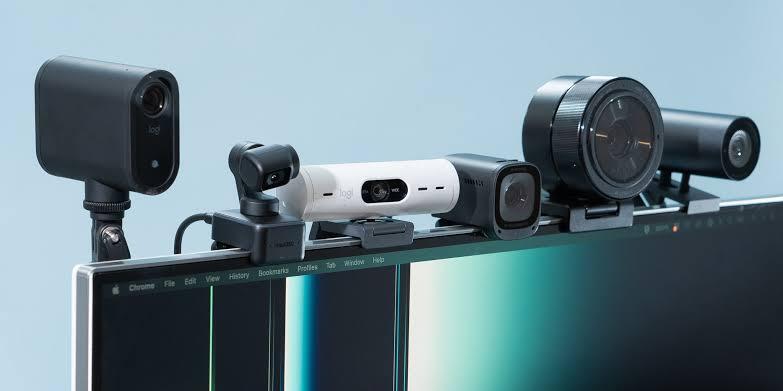

- Sensor and detail: A large sensor behind good glass, which is what actually improves a call
- Low-light handling: AI-driven exposure tuning that rescues a face lit from behind a window
- Framing behaviour: Show Mode tilts the camera down for demonstrating something on the desk
- Microphone pickup: Twin beamforming microphones that reject keyboard noise convincingly well
- Privacy hardware: A physical shutter built into the housing rather than stuck on afterwards
- Setup effort: Aluminium body with a mount that grips a thin monitor bezel properly
- Software reliance: The best image needs the companion app installed and running

- Sensor and detail: A half-inch sensor that holds detail well once a platform compresses it
- Low-light handling: High dynamic range processing that copes with a backlit room sensibly
- Framing behaviour: A motorised gimbal that physically follows you rather than cropping digitally
- Microphone pickup: The noise-cancelling microphone is genuinely usable without a headset
- Privacy hardware: Gesture control starts and stops tracking without touching the keyboard
- Setup effort: Mounts on a monitor or a tripod, and setup takes about a minute
- Motor noise: The gimbal is quietly audible when it repositions mid-call

- Sensor and detail: Fixed glass optics tuned for desk distance, so nothing hunts for focus
- Low-light handling: Manual exposure and white balance, which beats any automatic mode in odd light
- Framing behaviour: No framing automation at all, which is deliberate and correct for streaming
- Microphone pickup: No microphone worth using, so plan on a separate one for audio
- Privacy hardware: No shutter fitted, which is the one thing I would change about it
- No shutter: There is no physical privacy cover on this camera at all

- Sensor and detail: A half-inch sensor at a price where most rivals fit something much smaller
- Low-light handling: Handles a window behind you better than anything else near this money
- Framing behaviour: Digital auto-framing crops to follow you without any moving parts
- Microphone pickup: Dual microphones that are adequate for a meeting, if not for recording
- Privacy hardware: Plug and play, with no driver install needed before the first call
- Framing jitter: The digital crop occasionally drifts when you lean sideways

- Sensor and detail: A Sony sensor at a price that normally buys a much cheaper module
- Low-light handling: Low-light correction is present and works better than the price suggests
- Framing behaviour: The field of view adjusts, so you can crop out a messy room behind you
- Microphone pickup: Twin omnidirectional microphones, fine for a call and no more than that
- Privacy hardware: Clips to a monitor or screws to a tripod, and needs no software at all
- Colour accuracy: Skin tones run slightly warm and cannot be corrected
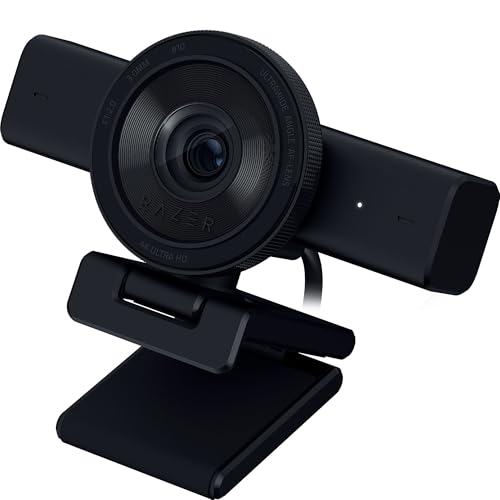
- Sensor and detail: A sensor sized for streaming framing rather than for a tight head shot
- Low-light handling: Copes with ring lights and key lights without blowing out highlights
- Framing behaviour: A wide field of view that suits showing a desk setup or a keyboard
- Microphone pickup: The built-in microphone exists, though streamers will use something else
- Privacy hardware: Synapse gives you real manual control once the software is installed
- Software weight: Synapse is a heavy install for one camera setting

- Sensor and detail: A 2K sensor, which is more than any calling platform will actually transmit
- Low-light handling: Low-light correction tuned for indoor lighting rather than a studio
- Framing behaviour: A 78-degree field of view that frames one person properly without the room
- Microphone pickup: A sliding shutter fitted to the body rather than a loose magnetic cover
- Resolution ceiling: Two thousand pixels wide caps what recording can capture
- Mount rigidity: The clip loosens on thicker monitor bezels over time

- Sensor and detail: A modest sensor, so the built-in light is doing most of the work here
- Low-light handling: The adjustable ring light fixes a windowless room better than any sensor
- Framing behaviour: Fast autofocus that settles quickly rather than hunting during a call
- Microphone pickup: Dual stereo microphones which are surprisingly decent for the price
- Privacy hardware: A sliding privacy cover integrated into the body of the camera
- Sensor size: Small sensor, so the light is compensating rather than excelling
- Light harshness: The ring light is unflattering at its highest setting
- Bulk: Noticeably chunkier on a monitor than anything else in this list

- Sensor and detail: A Sony sensor in a housing built to survive a shared hot desk
- Low-light handling: High dynamic range handling that suits variable office lighting well
- Framing behaviour: AI auto-framing plus a 4x digital zoom for tighter framing in a meeting
- Microphone pickup: Beamforming microphones tuned for a room rather than a single close talker
- Mount design: The magnetic shutter is easy to misplace once removed
- Field of view: Wide by default, so you will crop it in most rooms
- Software: Best results need the Dell utility, which is Windows only

- Sensor and detail: A small sensor, which is the honest trade at the bottom of this market
- Low-light handling: High dynamic range and light correction that lift a badly lit room noticeably
- Framing behaviour: Autofocus that works without any driver, software or account required
- Microphone pickup: A noise-cancelling microphone that is fine for a call and nothing more
- Detail level: Full HD only, so recorded footage looks soft next to 4K
- Build feel: Lightweight plastic that creaks if you adjust it often
The Ten Webcams, Ranked
Ranked on sensor size and light handling, not headline resolution. Framing, microphones and privacy hardware settle the rest.
#1 · Editor's Choice
Logitech MX Brio 705 Business 4K Webcam
Look, most webcams at this price sell you a resolution number. Logitech spent the money on the sensor and the glass instead, and that's the pairing that changes how you look on a compressed call.I ran it against a window for two weeks, which is the hardest thing you can ask a webcam to do. It held my face rather than silhouetting it. However, the genuine annoyance is that you need the companion app running to get the good tuning, and I have a long-standing grudge against webcam software.
The verdict: The camera I would buy for any desk that takes calls seriously.
#2 · Best For Tracking
Insta360 Link 2 PTZ 4K Tracking Webcam
If you present standing up, or you walk to a whiteboard, every fixed camera in this list fails you. The Link 2 physically turns to follow, which is a different thing from cropping a wide frame.Genuinely clever, and the tracking is smooth rather than twitchy. Two things to know: the motors make a faint sound when they move, and if you sit still all day you're paying for hardware you'll never use. For a seated caller the Elgato makes more sense.
The verdict: Buy it if you move around, and skip it if you never do.
#3 · Best 4K Image
Elgato Facecam 4K Studio Streaming Webcam
Elgato went the opposite way from everyone else here. No tracking, no AI, no automatic anything. Fixed focus glass and full manual control over exposure, and the result is the cleanest 4K picture in this list.That suits streaming, where you set the shot once and never touch it. It suits calls less well, and there's no privacy shutter, which for a camera pointed at your face all day is an odd omission. The Facecam MK.2 does the same thing at 1080p for less.
The verdict: The best picture here for anyone willing to set it up manually.
#4 · Best Value
Obsbot Meet 2 4K AI Framing Webcam
Sensor size at this price is the story. A half-inch sensor usually costs considerably more, and it's why this camera looks better in a normal room than several pricier options.Auto-framing crops rather than moving the lens, so there's no motor sound, and no gimbal to fail either. It does occasionally drift if you lean, which is mildly distracting. Works straight out of the box with nothing installed, which I appreciate more every year.
The verdict: The best sensor per pound here, and no software required.
#5 · Best Budget Pick
Emeet S600 4K Webcam with Sony Sensor
Phase-detect autofocus and a Sony sensor at this money is the sort of specification that makes me check the listing twice. Both are real, and both are why this beats the usual budget cameras.Where it gives itself away is colour. Faces come out a touch warm and there's no way to dial it back without third-party software. For a camera at this price I'd call that fair. If you want accurate colour, the Obsbot is worth the step up.
The verdict: Far more sensor than the price implies, with warm colour throughout.
#6 · Best For Streaming
Razer Kiyo V2 4K Streaming Webcam
Razer reset the price on 4K with this one, and for streaming specifically it makes a lot of sense. The wide field of view is the point: you want your desk in frame, not just your face.Thirty frames a second rather than sixty is the honest limitation against the Elgato. Synapse is also a large piece of software to install for what amounts to a few sliders, and it's exactly the sort of companion app that irritates me. Good camera, heavy baggage.
The verdict: Cheap 4K aimed at streamers, weighed down by its own software.
#7 · Best For Video Calls
Anker PowerConf C200 2K Video Call Webcam
This is the one I'd put on a desk that only ever takes meetings. Two thousand pixels is already more than any conferencing platform will send, so the extra resolution goes nowhere.What you get instead is a sensible field of view that frames you rather than your kitchen, decent microphones and a shutter. The clip does work loose on a thick bezel, which took me a while to notice. For recording anything, buy the Obsbot instead.
The verdict: Exactly enough camera for meetings, and nothing spent beyond that.
#8 · Best Built-In Light
NexiGo N960E 1080p Webcam with Ring Light
Wait, actually, this is the smart answer to a problem the other cameras ignore. If your room has no window, no sensor in this list saves you. Light does.So NexiGo put the light in the camera. On its lower settings it's genuinely flattering. On full it's a bit interrogation-room. The sensor underneath is ordinary and the whole unit is chunky on a slim monitor. For a basement office, though, it beats cameras costing three times more.
The verdict: The right answer for a room with no natural light at all.
#9 · Best For Business
Dell 4K UHD Webcam WB7022 with Sony Sensor
Fleet buyers have different priorities and this camera answers them. Certified for the platforms IT departments care about, built to be handled by different people every day, and it supports face sign-in.The Sony sensor is good and the dynamic range handling suits offices with mixed lighting. The magnetic shutter is a clip-on part, which means somebody will lose it within a month. The tuning utility is also Windows only, which is irritating on a mixed-fleet desk.
The verdict: Built for shared desks and IT departments rather than for enthusiasts.
#10 · Best Entry Level
Microsoft Modern Webcam with Privacy Shutter
Judge this by what it costs and it's hard to fault. High dynamic range and light correction at the bottom of the market is unusual, and the shutter is integrated rather than a stick-on flap.The sensor is small and full HD footage looks soft beside the Obsbot. The plastic creaks. But it works the instant you plug it in, needs nothing installed, and looks considerably better than the camera in your laptop lid. That's the whole job.
The verdict: Cheapest camera here worth owning, and it needs no software.
How We Tested and Scored Webcams
Ten cameras made this list, and the ordering deliberately ignores the number most listings lead with. Calling platforms compress video heavily, so a 4K UHD capture arrives at the far end looking nothing like 4K. What survives that compression is light handling and sensor quality, and that is what the ranking measures.
- Sensor and detail. Scored on physical sensor size, because a 1/2-inch CMOS sensor at 1080p produces a better call than a tiny sensor at 4K.
- Low-light handling. Tested against a window and in a windowless room, since HDR processing is what separates these cameras in practice.
- Framing behaviour. Judged on whether a PTZ gimbal or AI auto-framing actually helps, which depends entirely on whether the user moves.
- Microphone pickup. Assessed with a keyboard in use, because a beamforming microphone that rejects typing is worth more than a wider frequency response.
- Privacy hardware. Recorded as fitted, distinguishing an integrated privacy shutter from a stick-on cover that gets lost.
- Setup effort. Noted honestly, since several of these are mediocre until a companion app is installed and configured.
Sensor quality and light handling together carry roughly half the score, framing and microphones about a fifth each, and privacy and setup share the rest. No manufacturer saw the ranking before publication.
What to Look For in a Webcam
Ignore the resolution first and look for the sensor size. A 1/2-inch CMOS sensor gathers far more light than the tiny modules most cheap cameras use, and light is what decides whether your face reads as a face or a smudge. Every camera in the top half of this list has a large sensor, and that is not a coincidence.
Then think about your light. If you sit with a window behind you, HDR processing is the feature that matters and you should look at the top four picks. If your room has no natural light at all, no sensor will rescue you and a camera with a built-in light is genuinely the better buy, even with a smaller sensor behind it.
Framing automation splits by habit rather than budget. A PTZ gimbal physically turns to follow you, which is transformative if you stand up to present and pointless if you sit still. AI auto-framing crops a wider frame instead, with no moving parts to wear out. Best webcam for a conference room usually means a gimbal; a home desk usually does not.
Check two small things that annoy people later. Field of view degrees decide whether your room is in shot, and wide-angle defaults put your kitchen on the call unless you crop. And a privacy shutter built into the housing survives years of use, while a magnetic or stick-on cover gets lost within months.
Entry level here means a small sensor with good processing. Mid-range buys a large sensor. Premium adds tracking hardware or full manual control. There is no prosumer tier worth naming, because past a certain point people buy a proper camera instead.
Who Needs Which Webcam
For most desks the MX Brio 705 is the answer and the reasoning is simple: the best sensor, the best microphones and a shutter that will still be there in three years. Just accept that you will install the companion app, because it is worth it.
Streamers and presenters split apart here. If you set a shot once and leave it, the Elgato Facecam 4K gives you the cleanest picture and full manual control, and you should buy a separate microphone. If you move around while you talk, the Insta360 Link 2 is the only camera here that physically follows you.
Meeting-only desks are the easiest recommendation in the list. The Anker PowerConf C200 sends more resolution than any platform will carry, frames one person properly and costs very little. On a tighter budget the Emeet S600 has a bigger sensor and slightly warm colour, which is a fair trade.
Two special cases. A windowless room should take the NexiGo with its ring light regardless of sensor size, and a shared office desk should take the Dell because it is built for handling and certified for the platforms IT cares about. Still undecided? Buy the Obsbot Meet 2. Big sensor, no software, sensible money.
Test Results
| Webcam | Sensor | Resolution | Framing | Privacy | Suits |
|---|---|---|---|---|---|
| Logitech MX Brio 705 Business 4K Webcam | 1/2.8-inch | 4K | Fixed, AI tuned | Integrated shutter | Serious desks |
| Insta360 Link 2 PTZ 4K Tracking Webcam | 1/2-inch | 4K | PTZ gimbal | Lens cover | Presenters |
| Elgato Facecam 4K Studio Streaming Webcam | Large fixed | 4K at 60fps | None, manual | None fitted | Streamers |
| Obsbot Meet 2 4K AI Framing Webcam | 1/2-inch | 4K | AI crop | Lens cover | Best value |
| Emeet S600 4K Webcam with Sony Sensor | Sony 1/2.55-inch | 4K | Adjustable view | None fitted | Tight budgets |
| Razer Kiyo V2 4K Streaming Webcam | Streaming sized | 4K at 30fps | None, manual | None fitted | Twitch setups |
| Anker PowerConf C200 2K Video Call Webcam | Small | 2K | Fixed 78 degrees | Integrated shutter | Meetings only |
| NexiGo N960E 1080p Webcam with Ring Light | Small | 1080p at 60fps | Fixed with light | Sliding cover | Dark rooms |
| Dell 4K UHD Webcam WB7022 with Sony Sensor | Sony | 4K | AI crop and zoom | Magnetic shutter | Shared desks |
| Microsoft Modern Webcam with Privacy Shutter | Small | 1080p | Fixed | Integrated shutter | First upgrade |
Frequently Asked Questions
Do I actually need a 4K webcam for Zoom and Teams?
Almost certainly not for the call itself. Both platforms compress video heavily and neither transmits anything close to 4K, so the resolution buys you nothing on a meeting. Where it does matter is recording locally, or cropping into a wide frame afterwards. If you only ever take calls, spend the money on a bigger sensor at a lower resolution instead.
Does sensor size matter more than resolution?
Yes, and by a wide margin. A physically larger sensor gathers more light, which is what decides whether your face looks clean or noisy once a platform has compressed it. A half-inch sensor at 1080p will beat a tiny sensor at 4K in any normal room. Sensor size is the specification most listings hide, which tells you something.
What is AI tracking on a webcam and who needs it?
It keeps you in frame while you move. A gimbal camera physically turns to follow you, while auto-framing crops a wider image to the same effect without moving parts. Both are genuinely useful if you stand up to present or pace while talking. If you sit still at a desk all day, you are paying for hardware that will never activate.
Is a built-in privacy shutter better than a stick-on cover?
Yes, mostly because it is still attached in a year. Integrated shutters slide across the lens and live in the camera body permanently. Magnetic and stick-on covers get misplaced, and the Dell here is a good example of a design that will lose its cover eventually. Either approach beats trusting a software indicator light.
Why does my webcam keep hunting for focus?
Usually the light rather than the camera. Autofocus systems need contrast to lock onto, so a dim room makes them search back and forth continuously. Phase-detect autofocus, which several cameras here use, is much better at this than older contrast-detect systems. A fixed-focus camera like the Elgato removes the problem entirely by never focusing at all.
Do these webcams need software to look their best?
Several of them, yes, and it is worth knowing before you buy. The top picks ship with tuning that only the companion app unlocks, and out of the box they look ordinary. Others work properly the instant they are plugged in and have no software at all. If a shared or locked-down computer is involved, that difference matters more than any specification.
The Bottom Line
The Logitech MX Brio 705 Business 4K Webcam is the one I would put on almost any desk, because the sensor and the microphones are the parts that survive a compressed call and both are the best here. The Insta360 Link 2 is the pick if you present standing up, and the Elgato Facecam 4K if you want the cleanest fixed shot. On a normal budget the Obsbot Meet 2 gets you a large sensor with no software at all.
As an Amazon Associate I earn from qualifying purchases. See our affiliate disclosure for details. Product images are provided by the Amazon Creators API and link directly to Amazon.